Integrations
Works With the Doors You Already Have
QAccess is not a hardware replacement. It connects to the door controllers your building already runs and adds smartphone entry, cloud permissions, and a per-person access log on top of them.
Where QAccess Sits
One new device bridges equipment you already own to a portal you can reach from anywhere. Nothing at either end gets thrown away.
Already on site
Your Door Controller
The controller already wired to your doors stays exactly where it is. QAccess adds smartphone entry on top of it instead of ripping it out.
What we add
The QAccess Controller
This links your existing door hardware to the cloud. It is the only new equipment involved.
What you get
The Cloud Portal
Permissions, remote unlock, and a live access log for every connected door — reachable from anywhere, on any browser.
Compatibility
Built to Sit on Top of a Wide Range of Systems
Most buildings already have something at the door — a controller wired to a reader, a keypad, or a card system. QAccess is built to work alongside a wide range of that existing equipment rather than replace it, so a rollout usually comes down to which doors you want connected rather than whether your hardware will cooperate.
Every building is wired a little differently, though. Tell us what is at your site and we will confirm exactly what connects before you commit to anything.
Doors are then connected one at a time and stay in normal use throughout — there is no building-wide lockout while the work happens.
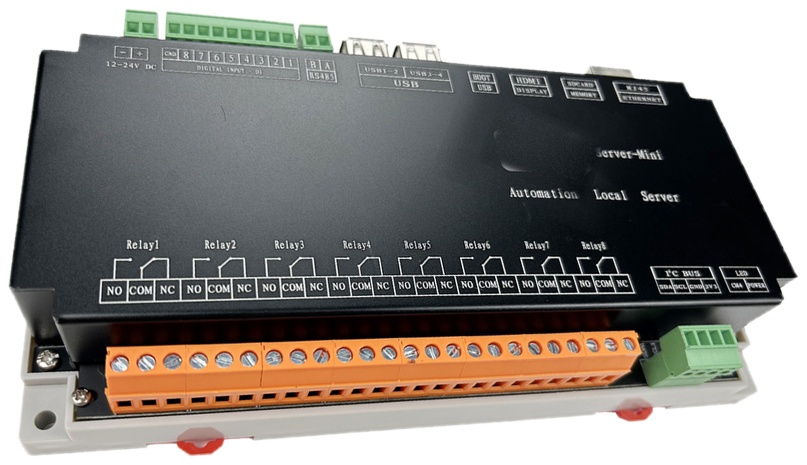
The QAccess Controller
Credentials
The Phone They Already Carry
There is nothing to issue, nothing to collect back, and no device for your building to buy on anyone's behalf.
Their own phone
iOS, Android, or just a browser. No proprietary fob, card, or reader-specific device to issue.
No app store download
An email invite and a registration link is the whole setup. Nothing to find, install, or keep updated.
Scan or tap
A QR code works on any phone with a camera. NFC is a tap for phones that support it — same credential either way.
2FA at the door
Entry clears a second-factor prompt before the door releases, so a forwarded link on its own opens nothing.
Day to Day
Fits How the Building Is Already Run
Connecting the hardware is the start. What makes it worth doing is what the portal lets you do afterwards.
Every building on one login
Manage more than one site from the same account using the organisation switcher — no separate logins per building.
Logs you can export
Pull the access record out as a file when there is a dispute, an incident, or an insurance query to answer.
Unlock from anywhere
Release a door remotely from the portal when someone is standing at it without access — no trip to site.
Changes apply immediately
Granting or revoking a door takes effect in real time. Nothing to re-issue, collect back, or reprogram.
Not Sure What You Have at the Door?
Most building managers don't know their controller by name, and that is fine — you don't need to. Send us a photo of the panel or tell us roughly how your doors work today, and we will tell you what connects.
Want the detail first? See how a rollout runs or look inside the portal.